
ZUMIMALL
Shenzhen Junan Technology Co., Ltd Business
4.61.86K Reviews
- Version
- 6.2.1
- Installs
- 100.00K
- Age Rating
- Everyone
Screenshots
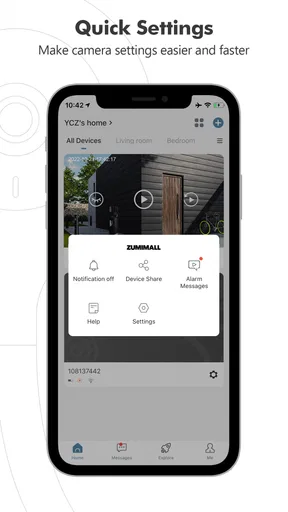
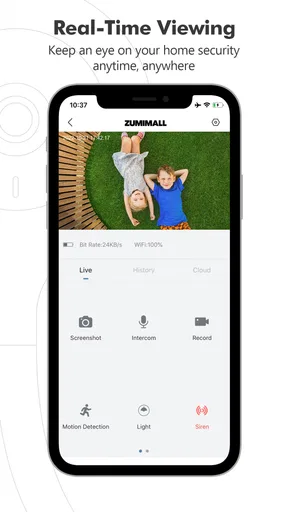
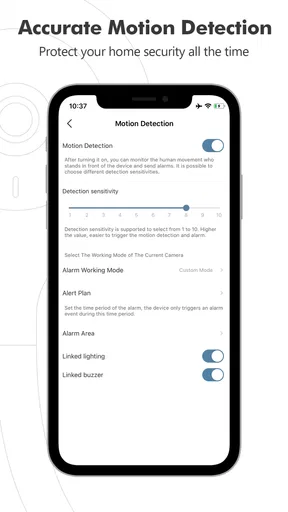
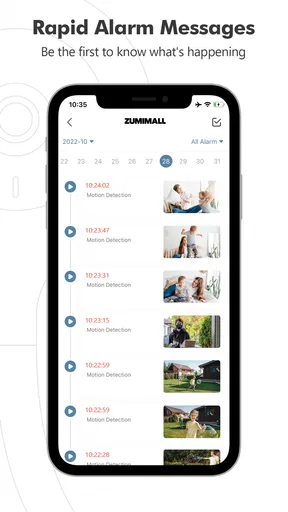
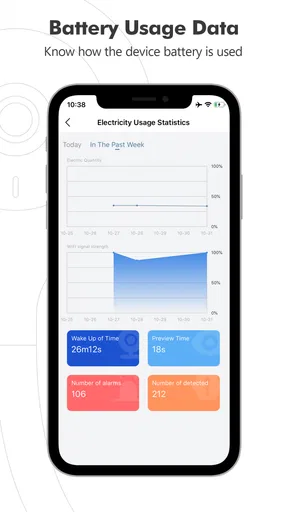
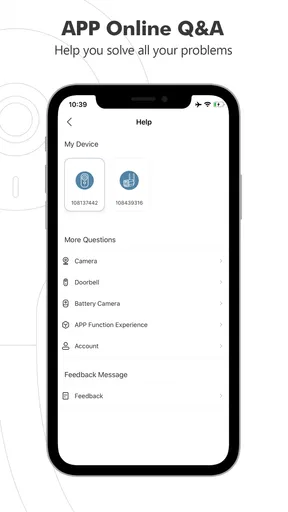
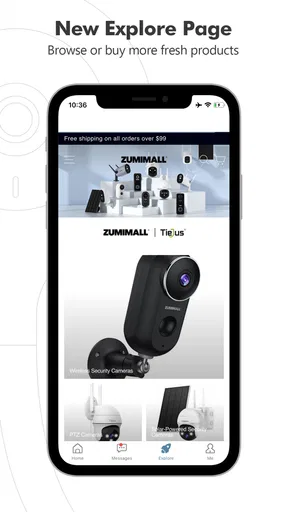
Our Review of ZUMIMALL
 Analysis by Appyee
When I’m choosing a home-security app, I care less about a long feature list than about whether I can check the right camera quickly and understand what an alert needs me to do. ZUMIMALL is a business app from Shenzhen Junan Technology Co., Ltd, built around controlling compatible home-security products. It is free to install, though in-app purchases range from $0.99 to $359.99 per item, so I’d check what a particular product or service requires before building a setup around it.
A practical routine starts with the device
The most useful way to approach a camera companion app is to make the first routine simple: open the camera you care about, check its live view, and decide what should count as a reason to look at your phone. In a home with more than one camera, I’d give each device a clear name based on where it points. That small housekeeping step makes an alert easier to act on when you are away from home, rather than leaving you to guess which view needs attention.
I’d also test the setup during ordinary activity before relying on it. Walk through the area a camera covers, then notice whether the alerts match what you actually want to know. A camera aimed at a busy entrance may produce more activity than one watching a quieter side door. The practical trade-off is straightforward: sensitivity that catches more movement can also make routine activity more distracting. A few deliberate checks help you find a balance that suits the space.
This sort of app is most useful when it supports a repeatable habit, not when it becomes another screen you feel obliged to watch. I’d check a live view when an alert is relevant, then return to it only when I have a reason. That keeps home monitoring purposeful and makes it less likely that a stream of routine notifications will cause me to ignore the one that matters.
Getting Started with ZUMIMALL
Setting up ZUMIMALL was surprisingly straightforward. After downloading the app from the App Store, I was greeted with a clean and simple interface that made navigation a breeze. The registration process was quick, and I was ready to pair my camera with the app in no time. The app supports a wide range of cameras, making it a versatile choice for any home setup.
Features That Stand Out
If you’re a fan of real-time notifications, you’ll love what ZUMIMALL has to offer. The motion detection feature immediately sends alerts to your phone whenever movement is detected, ensuring that you’re always in the loop. The video quality is stellar, offering clear images both during the day and at night, thanks to the integrated night vision.
Another feature I particularly enjoyed was the two-way audio. This allows you to communicate with anyone on the other side of the camera. Whether it’s scaring off a potential intruder or simply talking to a delivery person, this feature is incredibly handy.
Usability and Performance
One of the most impressive aspects of ZUMIMALL is its seamless performance. The app loads quickly, and the live feed is smooth with minimal lag. The developers clearly invested in a user-friendly experience, and it shows. The app also offers cloud storage options, which means you can easily back up your footage without any hassle.
For those who are tech-savvy, you can dive into more advanced settings and customize notifications, sensitivity levels, and even the recording schedule. But even if you're not a tech wizard, the default settings work perfectly for everyday use.
Make alerts work for your household
I’d treat notification settings as part of the setup rather than something to revisit only after the phone gets noisy. Start with alerts that answer a useful question: did someone approach the entrance, or did activity happen in a room you want to check? If a camera covers a space where family members regularly pass, broad motion alerts may be less helpful than they first seem. The right choice depends on what you need to notice, not on receiving the most alerts possible.
A realistic routine might be checking the entry camera while away at work after a delivery notification, using the live view to see what is happening, and speaking through two-way audio if a brief instruction would help. That is a modest but concrete use of the app: it can help you respond without rushing home or asking someone else to check immediately. I would still avoid treating a camera view as proof of everything happening at a property; it shows only what that device can see.
For a shared household, agree on who should receive alerts and who will check them. Multiple users can make access more convenient, but more people also means more chances of duplicated responses or confusion about who is handling an alert. A simple household rule—one person checks first, then updates the others if needed—can make shared access feel organized instead of noisy.
Settings worth checking before you rely on it
Notification sensitivity and recording schedules are the settings I would review first. A schedule can help align recording with the times a space is most likely to need attention, while sensitivity affects how much movement prompts a response. Rather than changing several options at once, I’d adjust one, observe the result during a normal day, and then decide whether another change is needed. This makes it easier to tell which setting improved the experience.
Storage deserves its own decision. Cloud storage can be convenient when you want footage backed up, but it may involve an in-app purchase, so I would compare the cost with how often I expect to review recordings and how important off-device access is to me. If I mostly want to check a live view, paying for storage may not be essential to my routine. If keeping recorded footage matters, I’d confirm the plan and product requirements before assuming a particular option is included.
Two-way audio is another setting to test when nobody is depending on it. Try speaking from the phone in a quiet moment and check that the camera’s location makes a short exchange understandable. It is useful for talking to a visitor, but it is not a substitute for being physically present, and it may be awkward where background noise or distance makes conversation difficult. Thinking through that limitation beforehand helps set realistic expectations.
Faster patterns for everyday checks
Once the basic setup is comfortable, the best shortcut is a consistent sequence rather than a complicated configuration: read the alert, identify the camera, open the live view, and decide whether two-way audio or a closer look is warranted. Repeating the same steps reduces the chance of reacting to a notification before you know which area it refers to. Clear camera names make this habit much faster, particularly when several views are available.
I’d also separate “something moved” from “something needs action.” A passing family member or ordinary activity may be worth recording without requiring a response. When an alert is routine, dismissing it after a quick check is more sensible than repeatedly reopening the same view. When it is unexpected, the live feed and audio give you a way to assess the situation, but the next step should depend on what you actually see.
For people who travel or work irregular hours, a repeatable check-in can be more useful than constant monitoring. For example, a homeowner could check the entrance after a delivery alert, then review the relevant recording later if storage is enabled and the event needs a closer look. This avoids turning the app into a live surveillance habit while preserving a practical way to follow up.
Security First
Security is the name of the game here, and ZUMIMALL delivers. The app uses advanced encryption to ensure that your data is safe from prying eyes. This level of security is crucial, especially when dealing with footage from your home.
Moreover, the app supports multiple users, allowing your family members to access the feed with their own devices. This feature is perfect for those who want to ensure the entire family can keep an eye on things when necessary.
Where it fits among security options
Compared with a camera’s basic built-in viewing option, a dedicated companion app can make it easier to bring live viewing, alerts, audio, and camera controls into one place. That convenience is the main reason I’d consider this app when choosing compatible equipment. By contrast, someone who already uses a broader smart-home platform may prefer an app that brings cameras, alarms, lighting, and other devices together. If managing several brands in one interface is the priority, a single-product ecosystem may feel limiting.
It is also different from a professionally monitored security service. A camera app helps you view activity and respond yourself; it does not replace a monitoring team or emergency plan. I’d choose it for a person who wants direct access to compatible home-security devices and is comfortable deciding what to do when an alert arrives. Someone who needs a service to assess alarms and coordinate a response should compare dedicated monitoring options instead.
Compatibility is worth checking before buying hardware. The app’s usefulness depends on the products you intend to connect, so I would verify that the exact camera or security device is supported rather than relying on a general impression that it works with many cameras. This is a more important purchasing check than the app’s interface: a smooth app cannot make an incompatible device part of your setup.
Advanced limits and sensible expectations
Even a responsive camera app has limits that are easy to overlook. A live view is only useful when the camera has a clear view of the area, and motion alerts are only as helpful as the placement and settings behind them. Before relying on a camera for a doorway or approach, I’d check its view from the installed position and consider whether ordinary movement nearby could create distractions. Placement can matter as much as app configuration.
Connectivity also shapes the experience. If a live feed takes longer to open or an alert arrives at an inconvenient moment, I would avoid assuming the camera has captured every detail in real time. For important situations, use the app as one source of information rather than the only safeguard. That is especially relevant if you are away from home and need a dependable response beyond checking a phone.
The app is free to install and is rated for Everyone, but that does not mean every connected feature or storage choice has no cost. Its in-app purchases span from $0.99 to $359.99 per item, a wide range that makes it sensible to check the specific purchase attached to the hardware or service you plan to use. I would not buy a camera on the assumption that every capability shown in an app is automatically included.
Who will get the most from it
I’d recommend considering ZUMIMALL if you already own, or are planning to buy, compatible home-security products and want a straightforward way to view them, receive motion alerts, and speak through a camera. It is a natural fit for someone who handles their own home checks and values quick access from a phone. The combination of live viewing and two-way audio is particularly practical for routine situations such as checking an entrance or addressing a delivery person.
I would be more cautious if you want every smart-home brand controlled in one place, expect professional monitoring, or dislike managing alerts yourself. It may also be a poor fit if you do not want to evaluate potential in-app purchases or if your chosen camera is not supported. Those are not minor details: they determine whether the app becomes a useful daily tool or another disconnected piece of a home setup.
The app has a 4.6 average from around 5.3 thousand ratings, with about 1.8 thousand written reviews, and has passed 100 thousand installs. It was released on August 1, 2020; version 6.0.1 supports Android 5.0 and later. Those figures offer a little context about its reach, but I would still make the decision based on device compatibility, the kind of alerts you need, and whether its purchase options suit your plans.
Final Thoughts
Overall, ZUMIMALL is a solid choice for anyone looking to enhance their home security. With its easy setup, reliable performance, and robust features, it’s hard to find a reason not to recommend it. Whether you’re tech-savvy or just getting started with smart home devices, this app has something to offer.
So, if you're on the hunt for a security app that doesn’t compromise on quality or performance, give ZUMIMALL a try. You might just find it’s the peace of mind you’ve been searching for.
Verdict
Strengths of ZUMIMALL
- Easy setup with user-friendly interface.
- High-definition video quality for clear viewing.
- Reliable motion detection alerts.
- Two-way audio for real-time communication.
- Long battery life for extended use.
Limitations of ZUMIMALL
- Limited cloud storage options available.
- App occasionally has connectivity issues.
- No support for third-party smart devices.
- Limited customization for notification settings.
- Requires strong Wi-Fi for optimal performance.
Similar Picks in This Category
View All
LinkedIn: Community & Network
LinkedIn3.8

Zoom Workplace
zoom.com4.1

Microsoft Teams
Microsoft Corporation4.6

Meta Business Suite
Meta Platforms, Inc.4.6

Webex Meetings
Cisco Systems, Inc.4.5

TeamViewer Remote Control
TeamViewer4.4
Frequently Asked Questions
What is ZUMIMALL, and what features does it offer?
ZUMIMALL is a mobile application designed to enhance home security by connecting with ZUMIMALL security cameras and devices. It offers features such as real-time video streaming, motion detection alerts, two-way audio communication, and video playback. Users can also customize alerts and monitor multiple cameras from their smartphones, providing a comprehensive security solution.
Is ZUMIMALL compatible with both Android and iOS devices?
Yes, ZUMIMALL is compatible with both Android and iOS devices. The app is available for download on the Google Play Store for Android users and the Apple App Store for iOS users. It requires a minimum operating system version, so it's essential to check compatibility with your device before downloading.
Does ZUMIMALL require a subscription or additional fees?
ZUMIMALL offers basic features for free, but certain advanced functionalities may require a subscription. Cloud storage, for instance, often involves a subscription fee for extended storage options. Always review the in-app purchase options or subscription plans to understand any potential costs associated with the features you wish to use.
How secure is the ZUMIMALL app and its connected devices?
ZUMIMALL prioritizes user security by implementing encryption protocols to protect data transmission between the app and connected devices. However, users should ensure their home network is secure and regularly update the app and device firmware to safeguard against vulnerabilities. Regularly changing passwords and enabling two-factor authentication can further enhance security.
Can multiple users access the ZUMIMALL app and devices simultaneously?
Yes, ZUMIMALL allows multiple users to access the app and connected devices simultaneously. This feature is particularly useful for families or households where multiple members need access to security feeds. Users can share access by inviting others through the app, ensuring everyone stays informed and up-to-date with security alerts.
